YOUR PHOTO. THE BULIN 47 FREESTYLE.
Bulin 47 AI Video Generator Turn Your Photo into a Freestyle
Put yourself at the center of a Bulin 47–inspired freestyle. Upload one clear photo and use the ready-made template to create your own vertical rap video—without filming yourself or editing clips together.
Watch the examplePhoto → video
INPUT PHOTO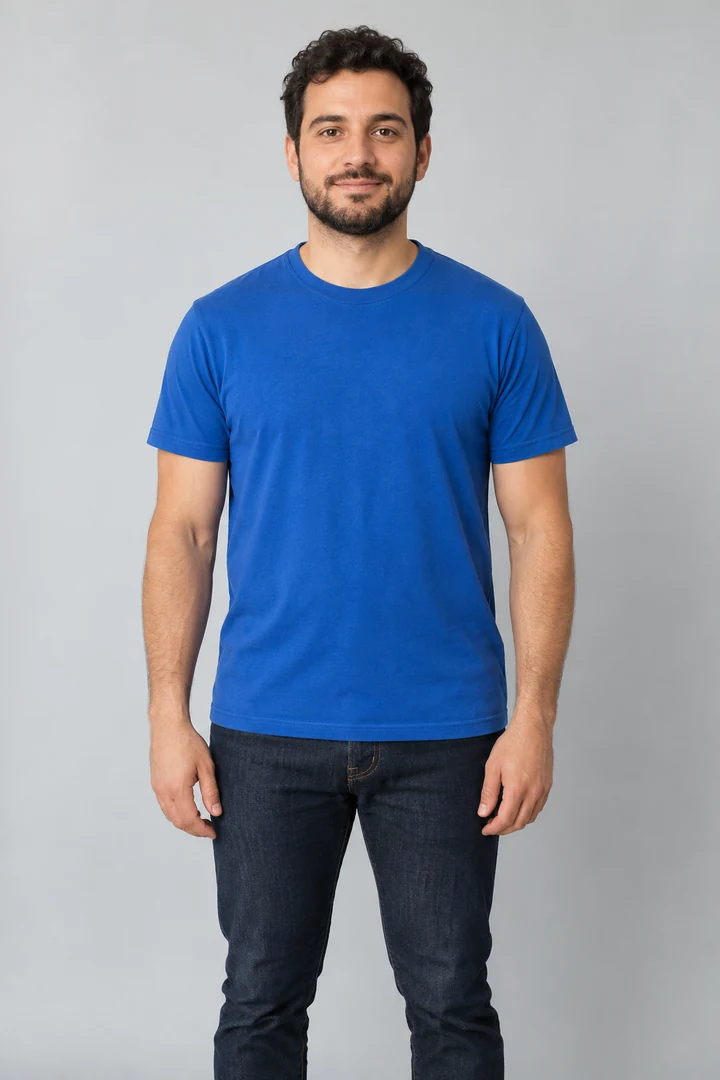 One clear photo→
One clear photo→AI VIDEO EXAMPLE
▶
Watch a portrait become a freestyle video.Freestyle reference example
Your freestyle starts here
One photo. A ready-made performance.
Add yourself to the freestyle
Choose a clear, front-facing photo of one adult.
Bulin 47 freestyle templateVertical video · template sound
IncludedUpload a photo, then confirm permission to continue.
Your photo is sent for processing only when you continue.
Your photo. Your freestyle. Start with a photo—the template takes care of the freestyle setup.
Original template audio included.What does the Bulin 47 AI maker do?
Use one clear portrait as the starting point for a Bulin 47–inspired freestyle video. The template guides the performance and scene. Explore the reference examples, prepare your photo and follow the steps below. Upload your photo and confirm permission to continue.
Read the photo-to-video guide ↗Bulin 47 video examples
Chimp character
Black shirt
Pink beanie
White tee
Cartoon character
Football remix
SEE WHAT CHANGES
From your photo to the freestyle.
Understand the input and the result
before you start.
01 YOUR STARTING PHOTO
One person. One clear face.
Start with a clear photo of the person you want in the video.
02 THE VIDEO RESULT
Your face in the freestyle.
Watch the complete example with sound.
FOLLOW ALONG
How to make your Bulin 47 video
Choose a photo, add it to the generator, then review your clip. Here’s what each step looks like.
One person · clear face · visible outfit01 / CHOOSE
Pick a clear photo
Choose a recent photo of yourself or an adult who agreed to appear. Use even lighting and keep the face clearly visible.
- Use a photo with just one person.
- Show the shoulders and outfit you want to use.
- Avoid heavy filters, masks and deep shadows.
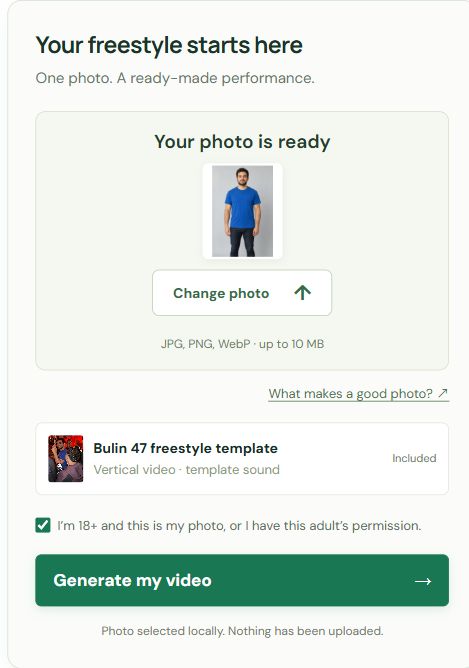
02 / ADD YOUR PHOTO
Upload and confirm
Open the generator at the top of this page. Your selected photo appears in the upload box so you can check it before continuing.
- Click Upload your photo, or drag a photo into the box.
- Confirm that you have permission to use the photo.
- Click Generate my video.
▶ Watch the whole clip with sound03 / REVIEW
Watch your video
Play the clip from start to finish. Check that the face stays recognizable and the movements look natural before sharing.
- Watch the face as the performer turns.
- Check the hands, clothes and nearby people.
- Turn the sound on and check the timing.
Upload your photo, confirm permission and continue to create your freestyle. Keep your delivery email accessible so you can find the finished video link.
THE FREESTYLE BEHIND THE REMIX
What is the Bulin 47 AI trend?
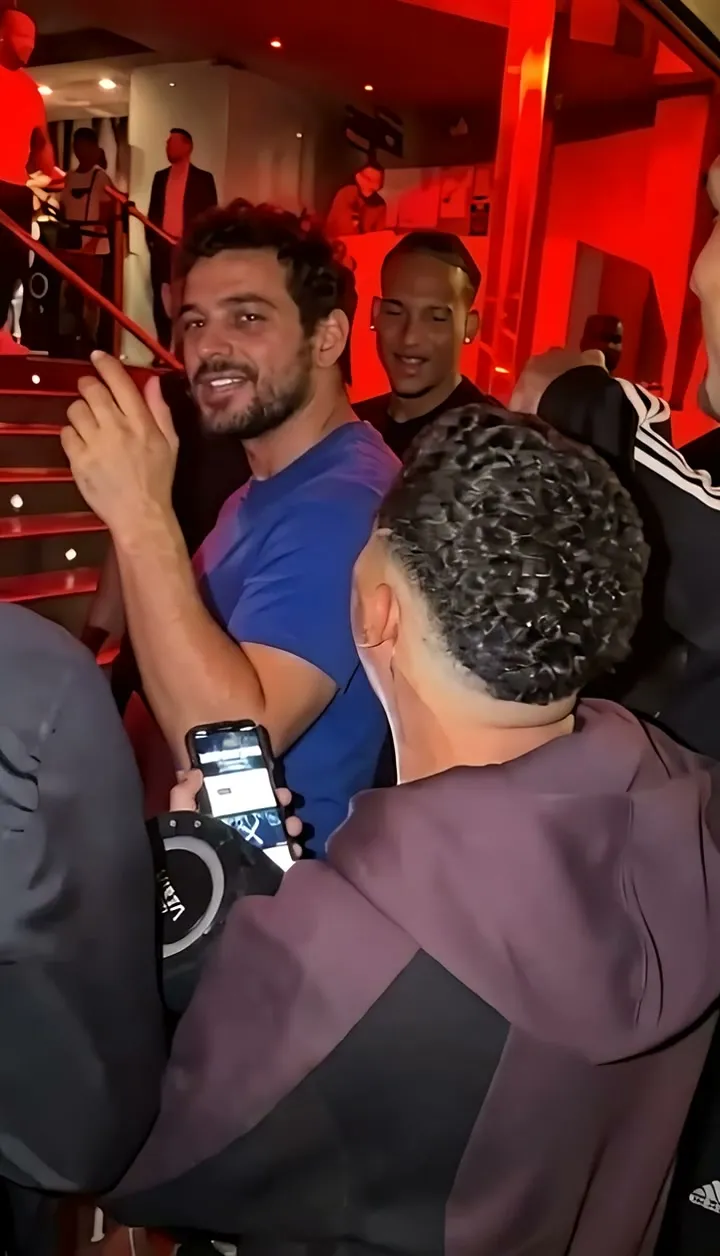
The Bulin 47 AI trend reimagines Bulin 47 and Kevin Wai’s freestyle with a different person at the center. A crowd gathers around a portable speaker, phones point toward the performer and the scene unfolds under red lights.
The remix works because the performance is familiar while the lead is unexpected. Instead of inventing a new rap scene, you use a portrait to give that recognizable moment a different main character.
You may also see it called the Bulin 47 rap AI trend, Bulin 47 freestyle AI video or Bulin 47 AI meme. On this page, they refer to the same freestyle-inspired format.
Understand the Bulin 47 AI trend ↗Your video at a glance
VIDEO DETAILS- Starting point
- One adult portrait
- Template
- Bulin 47 freestyle
- Template length
- 15 seconds
- Video format
- 9:16 MP4 · 720p
- Sound
- Template audio
Reference clips vary in length. The generation template is 15 seconds long and keeps its original audio. Review motion, appearance and sound in the finished file.
One freestyle scene. Different leading characters.
The red lights, close crowd and expressive gestures make the format easy to recognize.
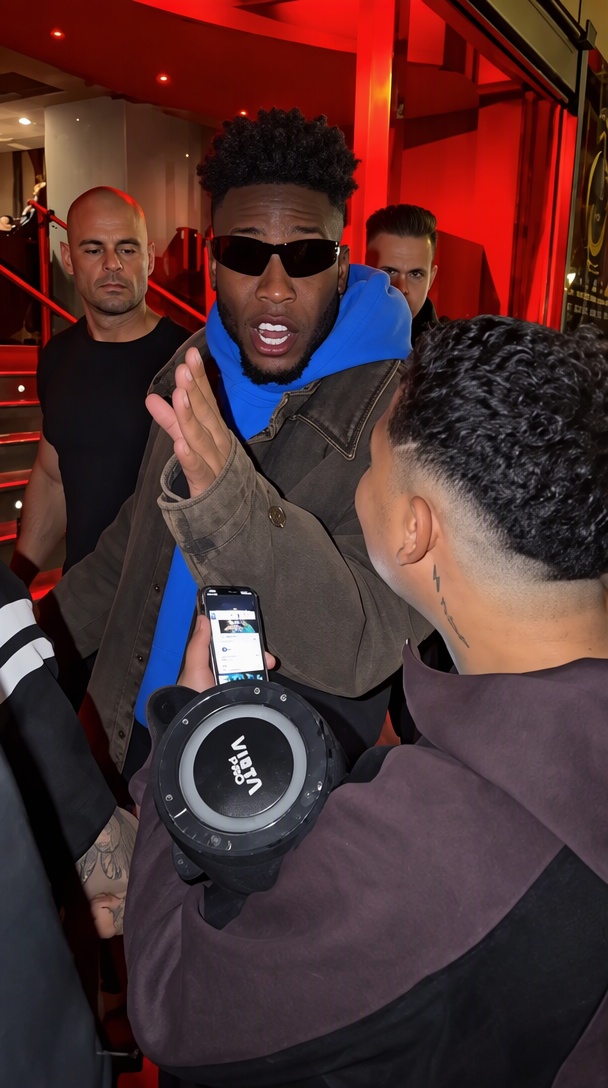
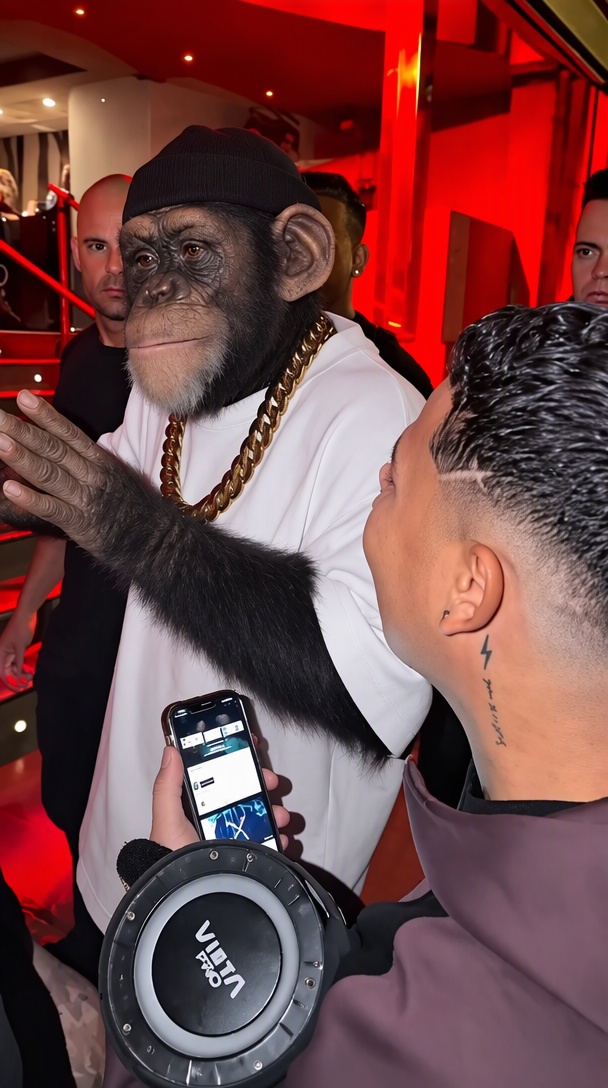
Reference examples of the trend. Character remixes illustrate creative ideas, not available presets.
Start with the look you want
Choose a photo that clearly shows your face, hair and clothes. If a favorite outfit is part of the look, include it in the photo.
The performance makes it recognizable
Expressions, head turns and shoulder and hand movements matter as much as the new face. The aim is a moving performance, rather than a portrait pasted over a video.
Keep the familiar freestyle feel
The speaker, crowd and red-lit doorway make the trend easy to recognize. AI can change details, so compare the whole scene when you review your clip.
CHOOSE WHO TAKES THE LEAD
Make a freestyle that feels like you
Make it yours with a familiar face, a favorite outfit or a reason to celebrate.
Put yourself in the scene
Start with an everyday portrait and imagine yourself at the center of the crowd. Use a recent photo so the result has a face your friends will recognize.
Give a friend the lead
Choose an adult friend who is happy to take part. A quiet friend doing an expressive freestyle makes a playful group-chat clip without needing everyone to film together.
Bring your own look
A favorite shirt, distinctive hair or a recognizable pair of glasses can help the version feel personal. Show those details clearly in the input photo and check them during playback.
Celebrate a birthday or a win
Make a version for an adult birthday, a team celebration or a small personal victory. Add your own caption when sharing so the moment has context beyond the trend.
Cartoon and football remixes in the gallery show how people reinterpret the trend. Character presets and whole-team editing are not included in this one-photo workflow.
SIMPLE VIDEO PACKS
Choose your video pack
Choose how many videos you want to make.
1 video
$9.90USD
$9.90 per video
- 1 photo-to-video generation
- 15-second template · original audio
- Vertical MP4 with template audio
- Credits valid for 90 days
4 videos
$29.90USD
About $7.48 per video
- 4 photo-to-video generations
- 15-second template · original audio
- Vertical MP4 with template audio
- Credits valid for 90 days
9 videos
$59.90USD
About $6.66 per video
- 9 photo-to-video generations
- 15-second template · original audio
- Vertical MP4 with template audio
- Credits valid for 90 days
One-time video packs. No subscription. Payment availability is confirmed before checkout.
GET YOUR PHOTO READY
Choose a clear photo
Use a sharp photo with your face clearly visible. Include your shoulders and upper body if you want the video to reflect your hairstyle and outfit.
WATCH THE WHOLE CLIP
What to check before you share
Play the full clip before sharing. Check the face, movements and sound—not just the first frame.
Does the face stay recognizable?
Look at head turns and moments when a person or phone passes in front of the performer. Check that the same face comes back after the overlap.
Do hands and clothing stay natural?
Watch moving fingers, arms, collars and accessories. AI can distort small details or change them between frames, even when the face looks convincing.
Is the right person in the spotlight?
The lead performer should remain the focus. Look for duplicated faces, blended people or changes that make the person holding the speaker look like the new lead.
Does the audio fit the action?
Listen with sound on. Matching a reference gesture does not automatically mean precise lip-sync; review the mouth timing and soundtrack together.
ANSWERS BEFORE YOUR FIRST VIDEO
Bulin 47 AI questions, answered.
Photo tips, video details and answers before you start.
Back to the generator ↗What is a Bulin 47 AI video?
It is an AI remix of the Bulin 47 freestyle with a different person in the lead. Your photo provides the new look, and the template guides the movements and scene. Watch the examples above to see how it looks.
How do I make my own version?
Upload a clear portrait, confirm permission and click Generate my video. Enter your delivery email, then choose a pack or use available credits. Review the total before payment. Checkout availability is shown before you continue.
Which person changes in the video?
Your photo is used for the lead performer behind the person holding the speaker. Check the result to make sure your face appears on the right person and does not blend into anyone nearby.
Do I need a prompt, CapCut or my own reference clip?
The template is designed to start with one photo, so you do not need to find a CapCut template or write a prompt here. Making the effect from scratch in another tool may require a reference clip and separate editing.
Is this the same as writing an AI rap video prompt?
A text prompt can describe a rapper and a crowd, but it does not specify every gesture or camera movement of this freestyle. A prepared template gives the video a more specific starting point. It still does not guarantee an identical recreation of the source clip.
What photo works best?
Use one adult facing the camera in even light. Keep the face sharp and visible. Include the shoulders or upper body if hairstyle and clothing are important. The tool accepts JPG, PNG and WebP images up to 10 MB.
Will the face, clothes and crowd stay exactly the same?
No exact match is guaranteed. AI may alter facial features, hands, clothing, accessories or background people. A clear portrait helps communicate your appearance, but you should review the whole clip, especially head turns and foreground overlaps.
How long is the finished video?
The generation template is 15 seconds long. Your result is delivered as an MP4; dimensions can depend on the video service. Reference clips in the gallery have different lengths.
Does it include sound and accurate lip-sync?
The workflow keeps the original template video’s audio and does not generate a separate soundtrack. Sound being present does not guarantee exact mouth synchronization, so listen and watch together before sharing.
Can I make a video for free?
Watching reference examples and choosing a photo are free. New video generation requires credits. Choose a one-time pack when checkout is available; there is no subscription.
Can I use a friend’s photo or make a character version?
For a person, use your own portrait or a photo of an adult who agreed to appear. Character and football edits in the gallery are inspiration from the wider trend, not selectable presets or a promise of character-generation support here.
What should I do if the result does not look like me?
Start by checking the photo: use a recent, sharp portrait without heavy filters or anything covering the face. Review whether the likeness changes during turns or overlaps. If generation fails, its credits are returned. For billing questions, see the Refund Policy or contact support.
Can I upload a different video?
This tool uses the prepared Bulin 47 freestyle template. It does not accept a custom reference video. If you want a different performance, that requires a separate compatible workflow.
Where is my selected photo stored?
Selecting a photo alone displays it locally without uploading it. Continuing to checkout or generation can save a photo and email draft in this browser’s IndexedDB and send them to the backend for processing. See the Privacy Policy for storage and deletion details.
Where will I find the finished video?
The result is shown on this page, and the delivery workflow emails a video link to the address entered at checkout. Keep that email and check your spam folder if needed. Contact support if a completed video has not arrived.
Is this an official Bulin 47 product?
No. Bulin 47 AI Maker is an independent project. The name identifies the freestyle trend and does not imply affiliation with or endorsement by Bulin 47, Kevin Wai or the social platforms.
Make your version of the freestyle.
Choose a photo and make the freestyle yours.